Get paid.
Get the tax right.
Invoices, quotes and receipts for freelancers, independent operators and small trades. Send them, see who's paid, and get the tax right on every line, without guessing.
Create your accountTry it with a sample business →
Free to start, and the invoicing stays free. No card to begin.
The invoice is the easy part. The tax is where it gets tricky.
Your labour is taxed. A permit you paid for your client isn't. A customer in another province pays a different rate. In Incleus you pick the tax on each line and it does the math, so the totals always add up.
Three steps, about a minute.
Make it
Add your lines, pick your client and the tax. Saved clients and items fill most of it in for you.
Send it
Incleus numbers it, and you email it to your client or print it. A sent invoice stays exactly as sent. If something's wrong, you cancel it and send a corrected one.
Get paid
If you've set up card payments, your client can pay from the invoice. Or record the cheque or e-transfer when it arrives. The balance updates on its own.
The real app, on a made-up business.
These screens come from Incleus itself, filled in with a sample business. You can click through the same one. Try it with a sample business →
Everything you need to send an invoice and get paid.
Quote it, invoice it, mark it paid, all in one place. No spreadsheet needed.
Invoices, quotes and receipts
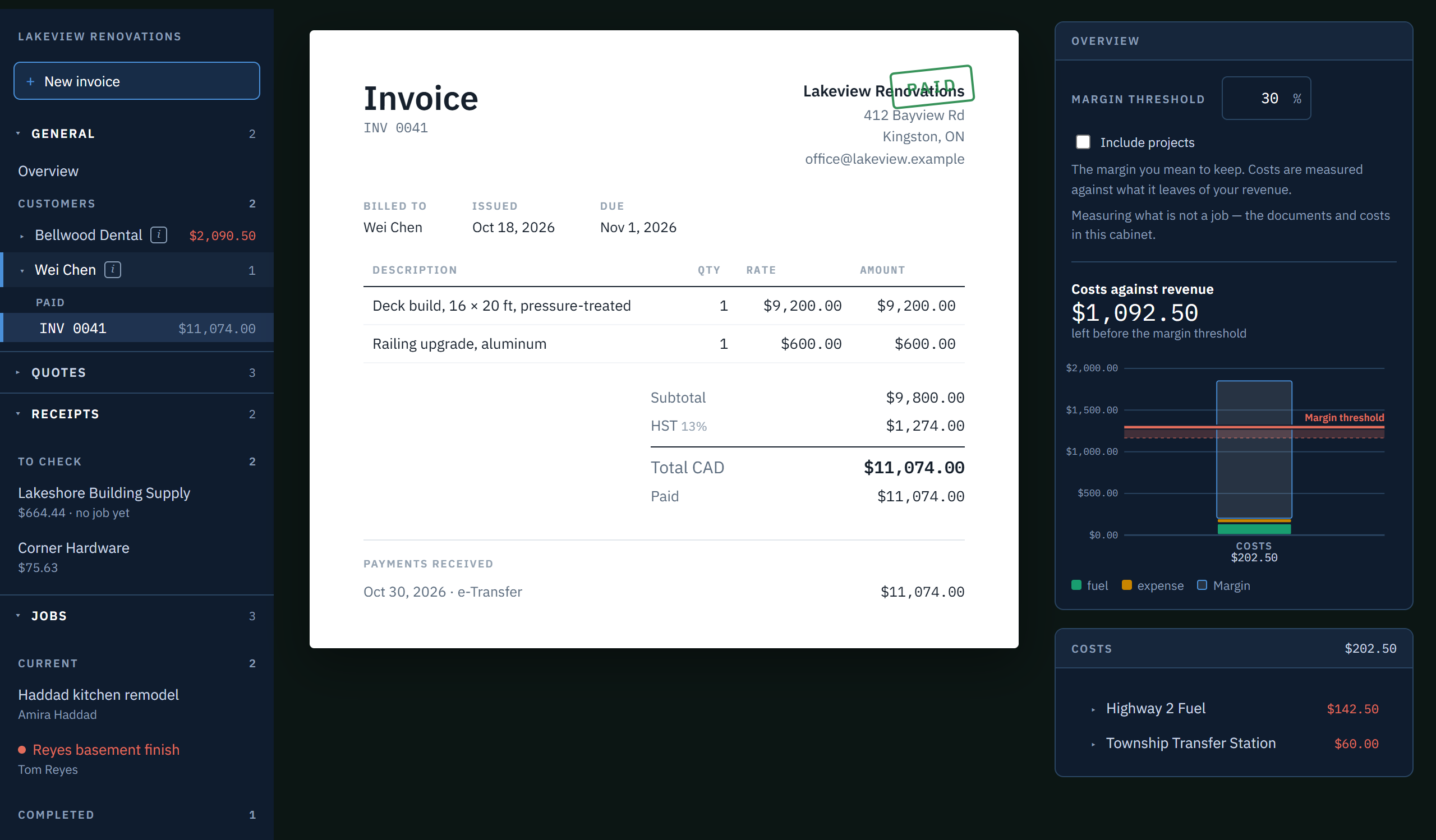
One clean document for all three. Turn a quote into an invoice, then into a receipt, without retyping a thing.
The right tax on every line
Labour, materials, a permit you paid on your client's behalf: each line gets its own tax, and Incleus adds it all up. Your prices can include the tax or have it added on top.
Tax worked out for you
Selling to customers in other provinces? On the Automatic tax plan, Incleus works out the rate from your customer's address, and shows how close your sales are to the amount where you'd have to register.
Clients, items and who's paid
Save the people and things you bill for, so most of an invoice fills itself in. See what each client still owes as payments come in. Invoice numbers are assigned for you and never repeat.
The invoice is the email
Your client gets the whole invoice in the email: the lines, the tax, what's been paid and what's left. It links to a page that always shows the current balance. No attachment to lose.
Your logo, your terms
Your logo and details on every document, and your payment terms where your client will read them. Change them later, and the invoices you've already sent stay exactly as they were.
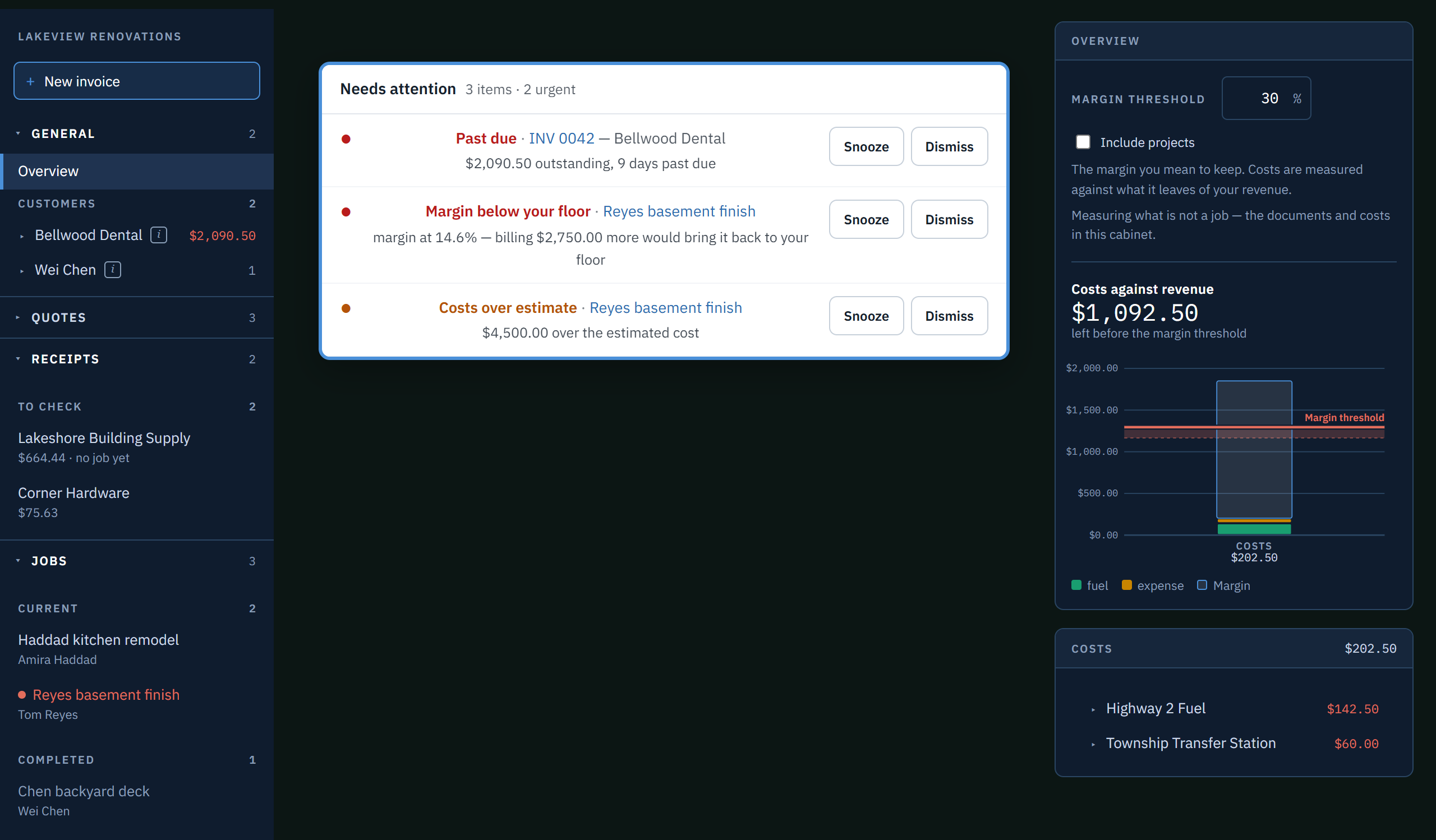
It tells you what needs you today, and goes quiet once it's handled.
A short list that clears itself as things get handled: once a client pays, their reminder is gone. Press a button below and watch it react.
What needs you now
Overdue invoices, deadlines coming up, a job that's slipping. The list keeps itself up to date, so once you're paid, the reminder is gone.
Money in, money billed
What came in this month and what you billed this month, side by side. What you're owed, and how late it is. And the sales tax you've charged so far.
How each client pays
“Late on 7 of 9, by 11 days on average”, worked out from your own history with them and seen only by you. A fact, never a score.
Which jobs made money
Your best and thinnest jobs, and where your sales come from. The kind of thing you'd usually only find out at year end.
For businesses that run jobs.
If your work involves materials, hours or a crew, the Operations plan shows you which jobs make money, while there's still time to fix the ones that don't. If you only need invoices, you can skip all of this.
Price a quote from your costs
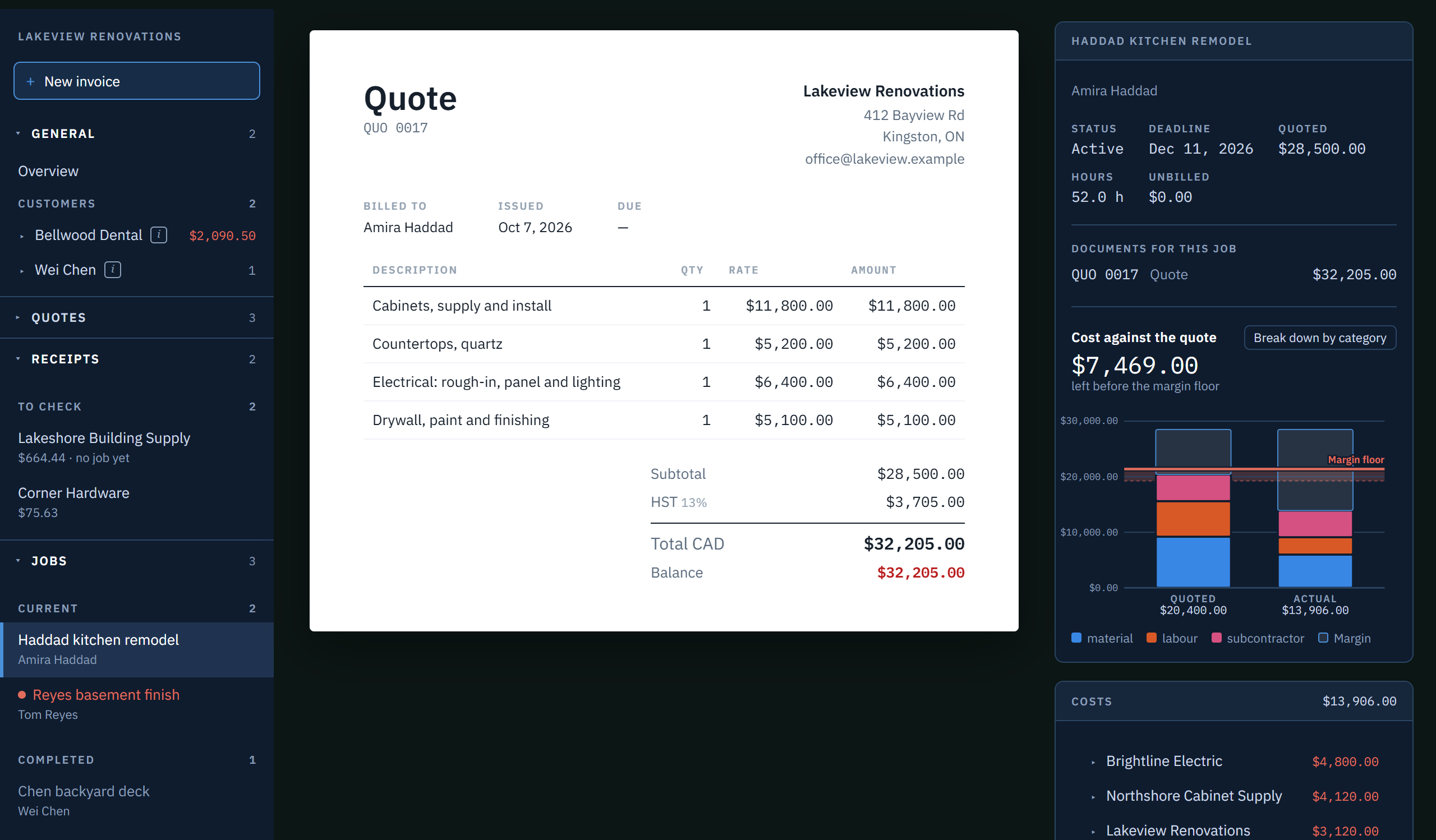
Add up materials, labour and subcontractors, then choose the profit you want, and Incleus sets the price. Your client sees the price, never the breakdown.
Hours and costs on each job
Log time and materials to the job as you go. Incleus compares them with what you planned in the quote, so you find out you're over on materials in week two, not at the end.
Supplier bills by photo or email
Snap a receipt, or forward a supplier's bill to your own Incleus address. Incleus reads the lines, and you check them before anything is saved. The original stays attached to the cost.
Know which jobs make money
Each job shows what it has cost so far against what you've invoiced. If its profit drops below the level you set, Incleus tells you and shows how much more you'd need to bill. It never changes an invoice on its own.
Bill what you tracked
Put the hours and costs you logged straight onto an invoice. Once they're billed, they can't be billed twice.
Ready for your accountant
Your sales, your costs, the tax you charged and the tax you paid, in one file, with each cost linked to its receipt. Incleus doesn't file anything or tell you what you owe. That's for your accountant.
Start free. Add what the work needs.
Invoicing is free and stays free. It isn't a trial. The paid plans are for working out tax automatically and for running jobs.
Free
$0forever — no card
No annual plan — nothing to renew
For sending invoices and getting paid.
- Invoices, quotes and receipts
- Tax set on each line, with prices including tax or not
- Saved clients and items
- Quotes priced from your costs
- Payments recorded, balances kept for you
Automatic tax
$20per month, CAD
or $200 a year — two months free
For selling to customers in other provinces or countries.
- Everything in Free
- Tax rates worked out from your customer's address
- Worked out once, when you send, not while you're drafting
- 100 a month included, then $0.10 each. The app shows your count, so there are no surprises
Operations
$80per month, CAD
or $800 a year — two months free
For running jobs with materials, hours or a crew.
- Everything in Automatic tax, with no limit
- Each job measured against what you've invoiced
- Hours and costs logged, then billed onto an invoice
- What you've spent and what you've paid out, kept apart
- A file for your accountant
- More than one person on the account
- Supplier bills by photo or email, each marked paid when you pay it
Cost and pay rates stay visible to owners and admins only, on every plan.
When they're on Incleus too, the invoice just arrives.
Bill another Incleus business and your invoice lands in their account — not just their inbox. They accept it, track it, and pay it on their side, from the same record. Less chasing, fewer lost PDFs.
Send your next invoice from here.
Make an account, put your business name on it, and send one. Nothing to install, nothing to schedule, and no card until you want the parts that cost us money to run.